So Why Are We Still Demanding the Desktop Apps?
For decades, Microsoft Office meant the following: Installed software on your locally (Word, Excel, Outlook, OneNote, Access, Visio, and PowerPoint)
These applications needed to live on your computer, updated periodically, and deeply tied to your physical device. But in the more modern age of today, we’re in a fundamentally different world with the internet being nearly ubiquitous. Microsoft office 365 has evolved into a cloud-first platform, and the question is no longer whether browser-based apps are viable… The question is whether we still need the desktop installations at all.
A growing number of professionals are starting to say the quiet part out loud: Microsoft Office is effectively in parity for 99% of use cases, and it might be time to leave the install requirements behind. The traditional argument, “the web apps are too limited”, doesn’t hold up nearly as well in mid-2026.
The Browser Has Caught Up
Let’s start with the obvious: the web versions of Office apps are no longer “lite” tools.
Microsoft 365 for the web now supports:
- Full document creation and editing
- Real-time collaboration
- Integrated comments and version tracking
- AI-powered features through Copilot
- Seamless file access via OneDrive and SharePoint
- Backup and versioning with OneDrive and SharePoint
In fact, Microsoft itself emphasizes that users can create, edit, and share documents directly in the browser from virtually any device with an internet connection. Combine that with automatic saving, continuous updates, and cross-device accessibility, and you have a compelling case for ditching local installs altogether.
Collaboration Is the New Default
If there’s one area where browser-based Office clearly wins, it’s collaboration.
In the desktop era, collaboration meant emailing attachments back and forth, dealing with version conflicts, and hoping nothing broke along the way. In contrast, Microsoft 365 web apps allow multiple people to work on the same document simultaneously, with live updates and visible cursors. That’s not just a convenience, it’s a fundamental shift in how work gets done across the modern world.
Browser-based Office enables:
- Instant co-authoring across teams
- Centralized file storage
- Easy sharing via links instead of attachments
These aren’t niche benefits anymore; they are the core workflow for modern organizations.
The True Cost of Desktop Apps
Desktop Office still exists, but increasingly, it feels like legacy overhead. To use when, one typically needs the following.
- Installation on each device they own and use
- Storage and installation space on the device
- Admin rights and privileges on the device for management
- Periodic updates and upgrades
- Compatibility considerations with newer versions
Meanwhile, the web version eliminates all of that. One just needs to sign in and start working in the latest and greatest version.
From an IT and operational perspective, browser-based Office dramatically reduces complexity and tech debt. There’s no deployment pipeline, no patching cycle, and no dependency on a specific machine. For end users, web apps mean freedom. One can work from their laptop, a shared workstation, or even a borrowed device and their entire workspace follows them.
But Is It Really “Parity”?
Here’s the honest answer: not completely at 100% parity yet. It is so close enough for 99% of people they would now know the difference.
Desktop apps still maintain an advantage in certain areas:
- Advanced formatting and layout tools
- Macros and automation (e.g., VBA)
- Handling large or complex files
- Mail merge
- Offline access without limitations
For example, desktop versions still support features like macros, advanced layouts, and complex document controls that aren’t available in the web apps. Similarly, certain advanced capabilities, like mail merge or sophisticated page layouts, remain exclusive to the desktop experience. [learn.microsoft.com]
So yes, the desktop still matters for a small few that are for heavy Excel users, technical writers, and power users. Here’s the key insight to remember, those users represent a shrinking minority. For the vast majority of office workers, those writing documents, building presentations, and collaborating daily, the web apps are more than sufficient.
The Role of AI Accelerates the Shift
Another major factor accelerating this transition is AI.
Microsoft is rapidly integrating Copilot across its entire ecosystem, including Word, Excel, and PowerPoint in both web and desktop environments. Because the web is inherently connected to the cloud, it becomes the natural home for these AI-driven workflows that can be updated at any cadence without local install changes. [microsoft.com]
Tasks like the following are now available anywhere and anytime:
- Drafting content
- Summarizing documents
- Generating data insights
- Creating presentations
They are also easier when everything lives in a connected, cloud-based environment. The browser isn’t just “good enough” anymore, it’s becoming the best place to work.
The Psychological Barrier
If the web version is so capable, why haven’t more people made the switch?
- The answer isn’t technical—it’s behavioral.
People are comfortable with desktop apps because they’ve used them for years. They associate “installed software” with power, versatility, control, and reliability. That said. their mindset is slowly changing, just as it did with email (remember Outlook vs. webmail?) and collaboration tools (Teams).
Over time, the default shifts to the web. What once felt like a compromise becomes the norm.
Aside 1: The End of the Double‑Click Era
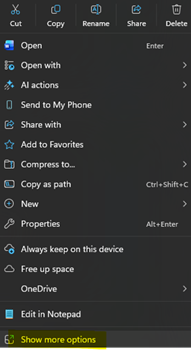
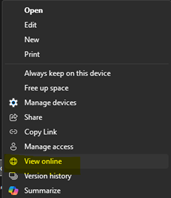
One subtle, but surprisingly noticeable, change in a browser-first world is the loss of the simple double-click. For decades, opening a file was instinctive: find it, double-click it, and you’re in and working. With Microsoft 365 in the browser, that muscle memory needs to be purposely and immediately broken. Instead, opening a local file often means right-clicking and choosing the “Show more options” feature and then “Open in browser,” introducing a small but real moment of friction for most users. This action may seem trivial, but it reflects a deeper shift, where access is no longer immediate and automatic. That shift often creates major frustrations, from files living on your device to files living in the cloud, but routed through your identity and workspace.
Right Click to Open in Web
Aside 2: The Features are Not Missing, They Just Need to be Un-Hidden
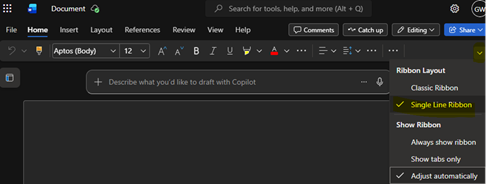
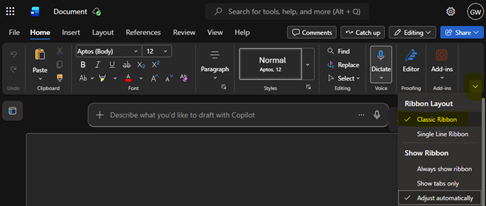
A surprising frustration for many users once they finally embrace the browser isn’t missing features, it’s not seeing the buttons for them. By default, Microsoft 365 often opens with the simplified “single-line ribbon,” which hides a significant portion of the tools people expect. This leads to the common complaint: “the web version doesn’t have everything.” In reality, much of that functionality is still there, you just need to switch to the “classic ribbon” view to reveal it. For many users, this is the single biggest hurdle after getting into the app: not a lack of capability, but a UI setting that unintentionally reinforces the perception of limitation.
Single Line Ribbon
Classic Ribbon
So… Do We Still Need Desktop Office?
The honest answer is nuanced, but no is where the answer starts.
- No: if your work revolves around everyday productivity and collaboration without ties to a specific device
- Yes: if you rely on advanced features, automation, or offline-heavy workflows while working from a single device
For many organizations, the future isn’t about eliminating desktop Office overnight, it’s about redefining it as a specialized tool for one-off situations, not the default.
Final Thoughts: The Tipping Point Has Arrived
Microsoft Office hasn’t disappeared, it has evolved. The browser-based experience is no longer an afterthought or secondary option. It’s a first-class platform that meets the needs of most users most of the time right now.
We’ve reached a tipping point where the question isn’t: “Can I use Office in the browser?”
But rather: “Why am I still using the desktop version?”
For a growing number of people, the answer is: there’s no good reason anymore.
Aside: The Browser Was Always the Plan (Just Not Microsoft’s)
It’s also worth remembering that the browser-first experience isn’t a new experiment! It’s how Google (G-Suite) Workspace has worked since day one. From its launch in 2006 as Google Apps, the entire suite was designed to run in a web browser, with documents, email, and collaboration living in the cloud rather than on a local machine. In that sense, Microsoft isn’t inventing something new, it’s catching up to a model Google has worked to make proven for over two decades. Interestingly, despite that browser-only approach, Google’s entry-level licensing plans often start slightly more expensive than Microsoft’s equivalent tiers.
The takeaway is simple: the web-first model isn’t a compromise, it’s a mature, industry-standard approach that organizations have been paying for, and relying on, for year