As an avid online shopper, I’ve spent a myriad of hours traversing both of the Amazon and eBay platforms. I’ve bought everything from tech gadgets to vintage collectibles. Over time, I’ve come to a surprising conclusion: while Amazon may dominate in convenience, eBay quietly outclasses at something far more fundamental — the search experience.
It might sound negligeable at first, after all, how hard can it be to type a few words into a search bar and find what you need? But the truth is, the way a platform handles the search they present can dramatically shape your shopping experience. When you’re a consumer who values accuracy, relevance, and control, the difference between Amazon’s and eBay’s search becomes glaring.
What is a product taxonomy
The term “product taxonomy” refers to the structured classification system used to organize products into categories and subcategories based on shared characteristics. It’s essentially a hierarchical framework that helps both sellers and consumers navigate large inventories by grouping similar items together in a logical, consistent way.
Key components of product taxonomy include
- Categories (e.g., Electronics, Clothing, Home & Garden)
- Subcategories (e.g., under Electronics: Headphones, Cameras, Smartwatches)
- Attributes (e.g., brand, color, size, condition, compatibility)
- Controlled vocabulary (predefined terms that sellers must use to describe products)
Why it matters
- For consumers: It improves search accuracy and filtering.
- For sellers: It ensures products are discoverable in the right context.
- For platforms: It enables better data organization, analytics, and user experience.
What is a Keyword (tag)
A keyword is a descriptive word or phrase used to identify and categorize content, functioning similarly to a tag, but primarily intended to improve searchability and relevance in search engines or platform-specific queries.
How They Relate
Tags are often used to group content (like blog posts, videos, or products) into thematic collections. Keywords, while also descriptive, are typically used to optimize search results for SEO (Search Engine Optimization), product discovery, or algorithmic relevance. They should not be used as the sole identification when seeking precision.
Example in Practice
On Amazon, a seller might use keywords like “wireless,” “Bluetooth,” “portable,” and “speaker” in a product title to help it appear in more searches.
Amazon’s Seach Engine
Amazon’s search engine, for all its magnitude and complexity, often feels like a chaotic mess when you look at the results. Sellers are given free rein to stuff their product titles with every imaginable keyword, resulting in listings that are bloated, confusing, and frequently ambiguous. You don’t just get what you searched for—you get what sellers think you might want, or what they hope will catch your eye even though it may not be connected in any way to the result you are hoping for.
Take a simple search like “vintage leather wallet”
On Amazon, you’ll be bombarded with results like “RFID Blocking Slim Wallet for Men – Travel Passport Holder – Vegan Leather – Credit Card Organizer – Minimalist Design.” It’s a mouthful, and it’s not even clear what the product actually is… Is it a wallet? A passport holder? A power bank? The keyword stuffing makes it hard to tell.
This isn’t just annoying—it’s inefficient. You spend more time filtering through noise than actually shopping. While Amazon offers filters on the left side bar, they’re often inconsistent across categories. Some listings let you sort by brand or material and others don’t. It’s a guessing game, and it’s one that gets old fast.
For that “vintage leather wallet”, these are some of the keywords (tags) that have been stuffed that confuses massively while not of them get priority:
- Vintage
- Leather
- Wallet
- Men
- Women
- Unisex
- Birthday
- Gift
- Credit card
- Holder
- Front
- Bifold
- Billfold
- Gift box
- Minimalist
- Stylish
- Crazy
- Horse
- Coffee
- ID Window
- Not leather
- RFID
- Blocking
- Slim
Ugh, that is a terrible set of criteria to be presented results from… I certainly do not want to see this wallet show up in many of those search results because it had some words that matched crammed into its product listing.
Example: a search for “coffee gift thin” would somewhere in the results, include this wallet
eBay Search Engine
eBay, on the other hand, feels like a breath of fresh air. Its search engine is built on a structured taxonomy—a carefully organized hierarchy of categories and item specifics that sellers must adhere to or simply not post the product for sale. This means that when you search for something, you’re not relying on keywords only. You’re tapping into a system that understands what things are, not just what they’re called.
Searching for “vintage leather wallet” on eBay is a completely different experience. You’ll find actual vintage wallets, clearly labeled with decade, condition, brand, and material. You can even filter by whether the item is new or used, whether it’s auction or buy-it-now, and even by the seller’s location. It’s precise, predictable, and deeply fulfilling.
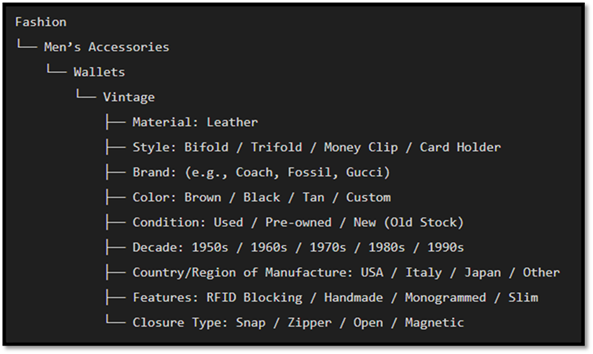
This structured approach is especially powerful when shopping for niche or collectible items. Looking for a “1980s Sony Walkman”, eBay will guide you through categories like “Consumer Electronics –> Portable Audio & Headphones –> Personal Cassette Players.” Amazon, meanwhile, might show you products that are not even manufactured by Sony along with Bluetooth speakers, cassette adapters, and random electronics that vaguely match the term “Walkman.”
The difference lies in how each platform treats data and cares about their buyers. Amazon’s system is open-ended, non-conforming, allowing sellers to define their own product titles and attributes that differ from nearly every other in the same product category. This leads to inconsistency and manipulation. eBay’s taxonomy enforces a controlled vocabulary, ensuring that listings are categorized perfectly and consistently. It’s the difference between a library (eBay) and a flea market (Amazon).
Even when searching for something as common as an “ergonomic mouse,” the contrast is clear. Amazon’s results are flooded with generic mice labeled “ergonomic” simply because it’s a trending keyword. eBay, however, lets you filter by hand orientation, DPI range, brand, and connectivity type. You’re not just browsing, you’re curating.
This isn’t to say eBay is perfect. Its interface can feel a bit outdated, and shipping times can often vary depending on the seller. But when it comes to search, the very foundation of online shopping, it’s unmatched. It respects the consumer’s intent, offering tools that empower rather than overwhelm.
Amazon’s algorithm, by contrast, often feels like it’s working against you the consumer. It prioritizes sponsored listings, favors high-volume sellers, and pushes products with high sales velocity. This means that niche items, new sellers, or unique products are often buried beneath a mountain of generic alternatives.
eBay’s search is more egalitarian. It doesn’t care how many units a seller has moved or how much they’ve spent on ads. It favors relevance, structure, and clarity over cash. And for consumers who value those things, it’s a game-changer.
When Sorting Shouldn’t Change the Results Count—But Somehow Does
One of the most baffling quirks I’ve encountered on Amazon is what happens when you sort search results by price, from lowest to highest. You’d expect the number of results to stay the same, right? After all, sorting is just rearranging the same data in a different order. It’s like alphabetizing a list of names: whether you go A to Z or Z to A, the number of names doesn’t change no matter what.
But on Amazon, it does change…
Let’s say you search for “Bluetooth speaker.” Initially, Amazon might show something like “1–16 of over 40,000 results.”
- Link from October 14, 2025: Amazon.com : bluetooth speaker

But the moment you sort by “Price: Low to High,” that number mysteriously drops—sometimes by 10’s of thousands. Suddenly, you’re only seeing “1–16 of 20,000 results.” Where did the other 20,000 go?
- Link from October 14, 2025: Amazon.com: Bluetooth Speaker

This isn’t just a glitch—it’s a symptom of a deep-rooted issue. Amazon’s search engine isn’t built on a stable, structured foundation. It’s a dynamic, ad-driven system that reshuffles and reinterprets results based on keywords, tags, filters, promotions, and seller metadata. Sorting by price doesn’t just rearrange the list—it seems to trigger a completely different query behind the scenes.
Now contrast that with eBay
On eBay, when you search for the same term—“Bluetooth speaker”—you might see “1–48 of 9,842 results.” Then you sort by “Price + Shipping: Lowest First,” and guess what? The number of results stays exactly the same. Not one listing disappears from the results list at all. The platform simply reorders the same dataset, as it should, so you can select the product you wish to purchase.
This consistency is a direct result of eBay’s structured taxonomy. Because listings are categorized and filtered using a controlled vocabulary, the platform doesn’t need to guess or reinterpret your query when you sort. It just sorts the results like a list of names.
Amazon’s behavior, on the other hand, raises serious questions about their transparency. Are listings being filtered out because they don’t meet some hidden criteria? Are sponsored products being prioritized or excluded based on sort order? As a consumer, I shouldn’t have to wonder, I should just know.
Sorting should be a neutral action. It should never change the number of results; it should only change the order in which they appear. That’s basic logic, and yet, Amazon breaks that logic every time you try to shop by price. eBay gets it right and Amazon doesn’t. Once you notice it, you can’t unsee it.
Saved Searches
Another standout feature that sets eBay apart from Amazon is its ability to save searches. On eBay, buyers can create custom search queries—complete with filters and sorting preferences—and save them for future use. Even better, eBay allows you to set alerts for these saved searches, notifying you when new items matching your criteria are listed. This is incredibly useful for collectors, deal hunters, or anyone looking for rare or time-sensitive items.
Amazon, surprisingly, lacks this functionality. While you can add items to wish lists or follow specific products, you can’t save a search query itself. That means if you’re looking for something specific—say, a discontinued Bluetooth speaker or a vintage leather wallet—you must manually re-enter your search and reapply filters every time you want to find one. eBay’s saved search feature isn’t just convenient—it’s a powerful tool for persistent, targeted shopping that Amazon simply doesn’t offer.
Conclusion
In the end, the choice between Amazon and eBay comes down to what kind of shopper you are. If you want fast shipping and mainstream products, Amazon might be your go-to. But then if you care about finding exactly what you’re looking for, without wading through keyword chaos, eBay is fair champion.
As a consumer, I’ve learned that search isn’t just a feature—it’s core to my buying experience. And in that realm, eBay doesn’t just compete with Amazon. It quietly, confidently, outperforms it search by search and day by day.