A Responsibility, not a Routine
When responsible for reviewing a candidate’s resume for an open role, whether as a hiring manager, team lead, or people team member, one carries more than just the duty of evaluating the document’s content. One is accountable for endorsing that someone (the candidate) who will not only meet the job requirements but also contribute meaningfully to the team and organization. That approval reflects the responsible individual’s judgment, and it may even carry more weight than other decisions made in one’s daily work.
The process of selecting a candidate goes far beyond just checking boxes based on their resume content. It requires a careful balance of assessing potential, evaluating abilities, checking for a cultural fit, and measuring long-term contribution. When approval is given, one’s not just filling a vacancy, one’s shaping the future of the team and organization, through the decision. This blog explores the critical steps in that journey, from resume reviews and ultimately one’s choice.
The Myth of Longevity
One of the most persistent myths in hiring is that the total years of experience automatically equate to an expertise level for that skill. While tenure can suggest exposure to an ability, it doesn’t guarantee knowledge, growth, adaptability, or excellence in the subject or tool.
A candidate may claim 20 years of experience using Microsoft Excel, yet all we can 100% determine from that statement is that they have been using the application for that long. That assertion does not indicate or assure that the individual actually knows how to use the app.
In fact, long stints in the same role without advancement may signal stagnation rather than proficiency. On the other hand, a candidate with just five years of focused, high-impact work might bring fresh perspectives, up-to-date skills, and a stronger drive to contribute and evolve.
Example of the Longevity Myth
My own personal truth is used within this example…
“I have been playing soccer since 1980″, though in reality, I am terrible at it.
This is a clear illustration of a term of experience meaning nothing at all to the reader without an attached measure of expertise.
TIP: Instead of asking “How long have you done this?” ask one of the following pointed questions.
- How in depth is your skill in this matter?
- What are your favorite feature sets within the tool and why?
- How would you solve ‘this problem’ with the application?
Their answer to those questions will illustrate their understanding of the application, an ability to determine preferences, and think on the fly. All of that being an extremely important thing to measure during an interview.
Common Issues with Overvaluing Longevity
- Complacency: Long tenure can sometimes lead to stagnation
- Resistance to change: Candidates may be less open to new tools, workflows, change, growth, or team dynamics
- Inflated expectations: Years on a resume can create assumptions that aren’t backed by performance
Document Construction: The Resume as a Reflection of Skill
A resume is more than a summary, it’s a representation of the candidate’s attention to detail, communication skills, and professionalism. If someone claims to have used Microsoft Word for since 1995, their resume’s structure and build should reflect that mastery with excellence.
Tip: If a candidate can’t present themselves professionally ‘on paper’, it may raise questions about how they’ll communicate within the role. Since flaws reveal the truth, resumes can often reveal more than candidates intend them to.
Issues to Look for
Inconsistent formatting:
- No use of Styles (Microsoft Word Styles)
- Mismatched font selection (Body Text)
- Inconsistent font sizes
- Differences in font colors
- Clear use of copied/pasted text that appears out of place
- Uneven character spacing
- Incongruent line breaks
- Manual tabbing:
The act of pressing Space, Space, Space, Space, Space just to get text to indent to the right. - Manual centering:
The use of Tab, Tab, Tab, Tab, Tab, just to get text to move towards the middle of the page and sort-of look like it may be centered.
Poor layout
- No clear (or hard-to-read) sections and paragraphs (Breaks in Word)
- Lack of page breaks:
The use of pressing Enter, Enter, Enter, Enter, just to get text to the next page - Missing contact info section on the initial page ‘above the fold’
Lack of structure:
- No visual distinction between the formatting of roles, companies, schools, locations, dates, and responsibilities
- No external hyperlinks to Diplomas, Certifications, LinkedIn, Schools, Companies, Organizations, or Websites mentioning them (Hyperlinks in Word)
Well-Constructed Resumes Should Use
- Styles for headings (Microsoft Word Styles)
- Consistent body text for main content (Body Text)
- Bullet points for clarity (Bullet Points)
- Proper alignment and spacing
- Section or page breaks for readability (Breaks in Word)
- Tables to ensure alignment between lines and on the right (Tables in Word)
- Clickable hyperlinks for email addresses and Websites (Hyperlinks in Word)
Proper Methods to Review a Resume
Ask for the Resume in Microsoft Word (.docx) format only, while not accepting a .PDF, .pages, or .RTF file.
How to Investigate if a Resume is Well Constructed
The steps to complete the task:
- Open the .DOCX version of the resume in the latest version of Microsoft Word. It doesn’t matter if you have the Web or Desktop version of Word because there is parity in the applications now.
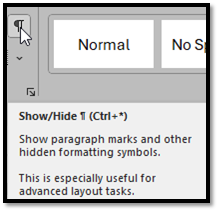
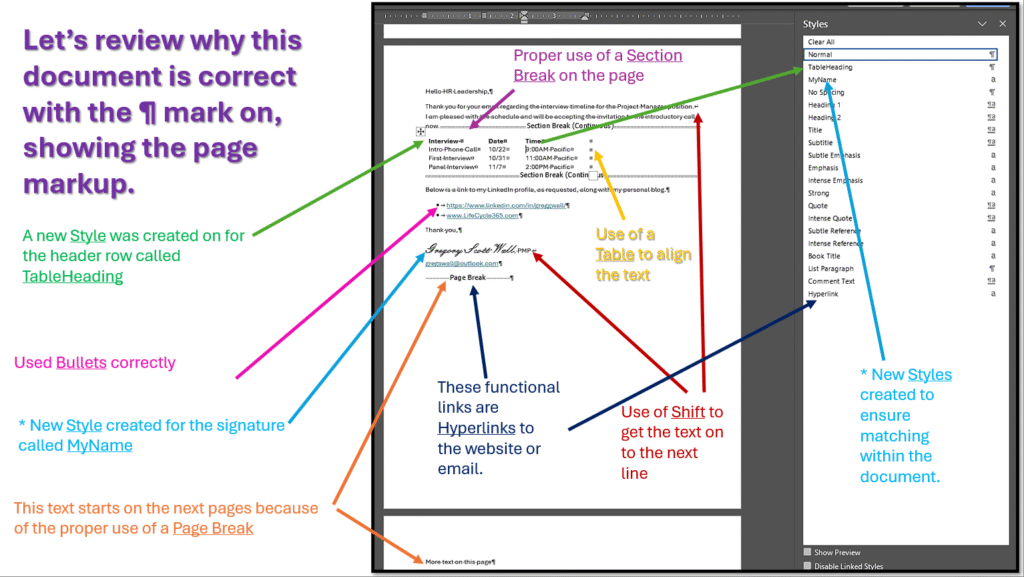
- Click the paragraph (¶) mark on the “Home” ribbon, to show the page markup
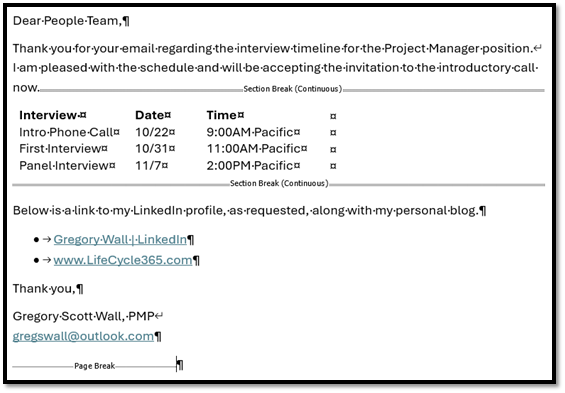
- This will turn on a bunch of strange characters, shown in the image below, that may be annoying at first. Give this a chance, as you will get used to it.
- With the markup turned on:
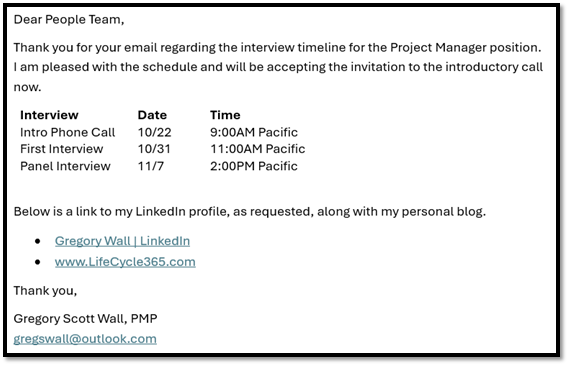
- With the markup turned off:
- With the markup turned on:
Reviewing Resume Structure in Microsoft Word
A resume is the first impression a candidate makes. Reviewing the structure means more than just checking for typos as it involves evaluating how well the candidate has used Word’s built-in features, styles, and abilities. If someone claims to have decades of experience with Word, their resume should demonstrate mastery of the tool.
Inconsistencies in formatting like mismatched fonts, uneven margins, or manual spacing instead of paragraph settings can signal a lack of attention to detail or unfamiliarity with the tool. A well-structured resume should be easy to read, visually balanced, and make effective use of Word’s formatting capabilities. Reviewing these elements not only helps assess the candidate’s technical skills but also their ability to present information clearly and professionally which is an essential trait in most professional roles.
Proper Use of Paragraphs: Each job entry, section, or bullet point should end with a paragraph mark (¶) and no more than two of them in a row.
Tip: If you see more than two paragraph (¶) marks without text between them, that’s a sign of not knowing how to use Word formatting and that is not ideal.
Consistent Use of Styles: (Styles in Word) Click into headings like Work Experience, Education, Certifications, etc. Look at the Style box in the ribbon (top left of the Home tab). If it says “Heading 1” or “Heading 4,” then that’s good example of proper use. If it says “Normal”, “Normal+Font+Size” or “No Style,” and the text is manually bolded or resized, that’s a sign of poor formatting.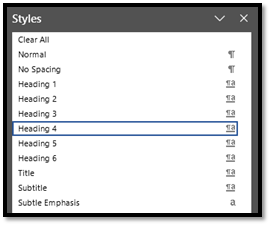
Did they use consistent styles for headings and body text that allows you to use the native Navigation functionality in Word as shown below.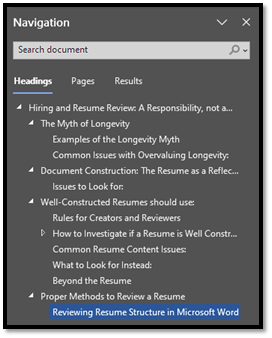
Manual Spacing: Look for multiple spaces used to push content around. This is a sign that the resume was formatted manually instead of using the core-functions built into the Word like margins, breaks, tables, or styles.
- For example, if someone uses 10 spaces to align dates instead of a tab, indent, or table, it’s a big red flag.
Improper Use of Tabs: Tabs (→) should be used sparingly and consistently, ideally for aligning dates or locations and certainly not for centering something on the page. If you see a mix of tabs and spaces used to align text, it suggests the resume was built without formal structure.
Line Breaks Instead of Paragraphs: Line breaks (↵) are often used when someone copied and pasted text into the document from a website or hits “Shift+Enter” instead of “Enter”. These can mess with spacing and readability for the blind and especially in ATS (applicant tracking software) systems.
Example with These Used Correctly within a Document
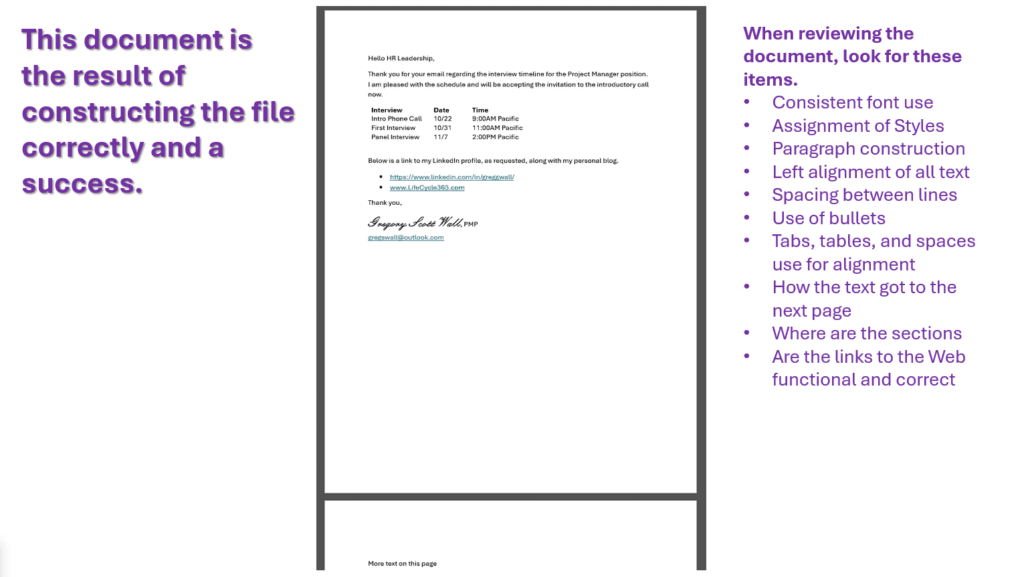
View this the file in a new tab
Improper Page Construction (that looks similar to the noted issues below)
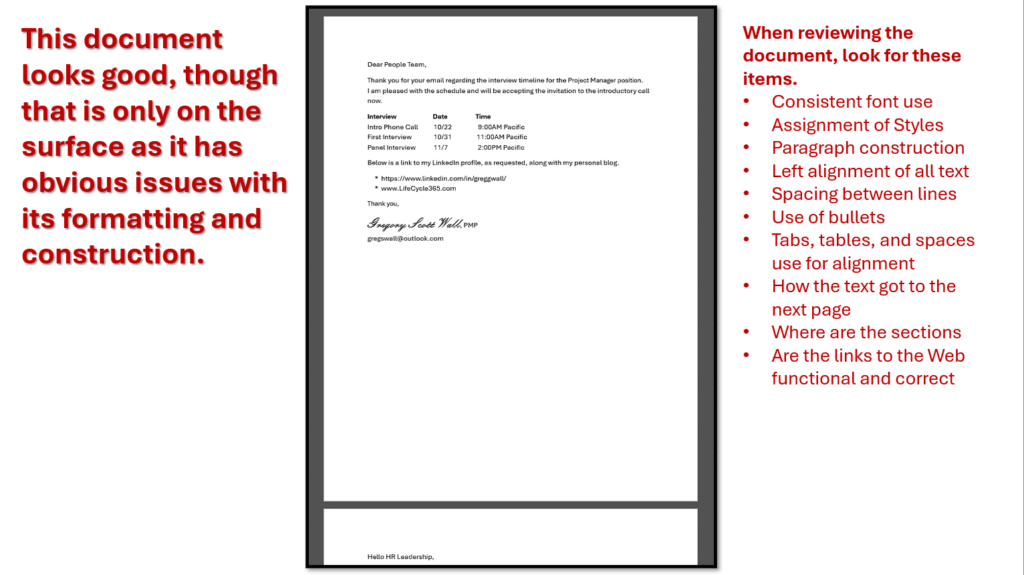
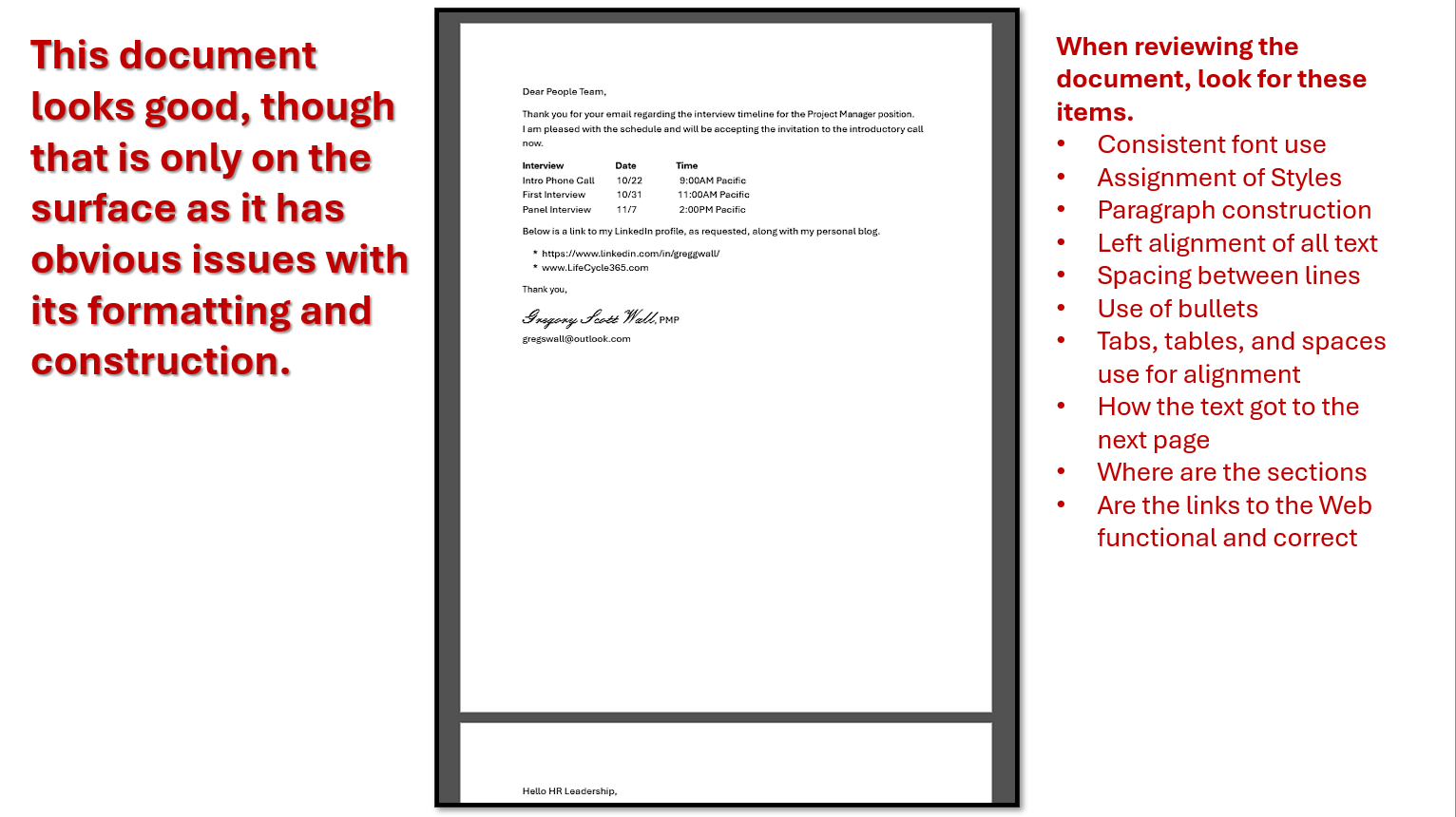
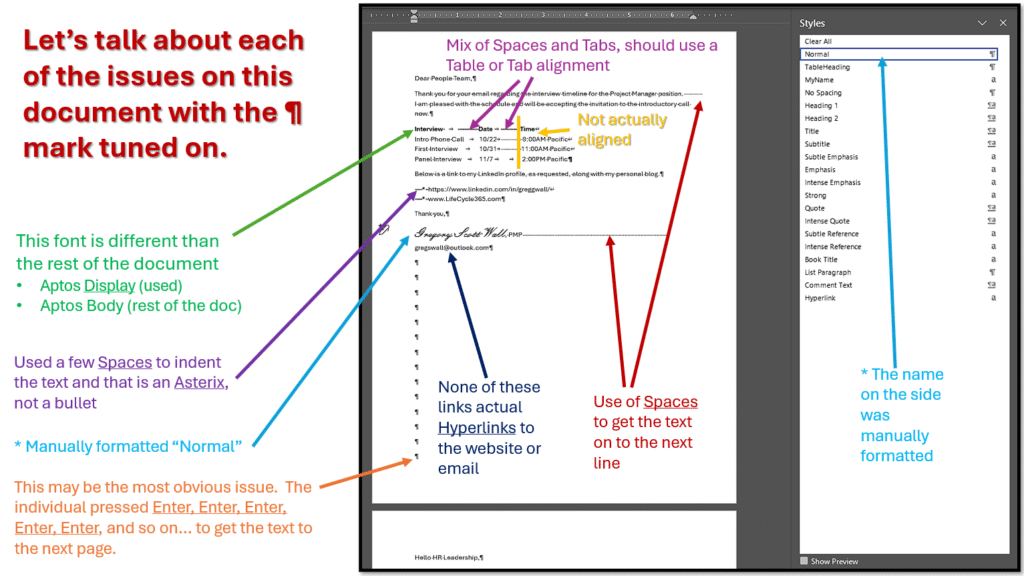
Actual Files to Review Versus the Images Above
Here are the PowerPoint File and Word Document that illustrates that was used within the above example.
Rules for the Creator and Reviewer
No key on a keyboard should be pressed more than twice in a row
- Use of “Tab” instead of Space, Space, Space, Space (Tab key)
- Use of “Page Break” or “Section Break” instead of Enter, Enter, Enter, Enter, Enter (Shortcut to make a Page Break in Word)
- Use of “Center” instead of Tab, Tab, Tab, Tab, Tab, Tab (Center Text in Word)
Other Common Resume Content Issues
Misspellings and grammatical errors: These suggest carelessness or lack of review
Copy-paste job descriptions: If the resume mirrors the job posting word-for-word, it may indicate a lack of originality or real experience
Vague language: Phrases like “responsible for” or “helped with” without measurable outcomes
Overuse of buzzwords: “Synergy,” “self-starter,” “dynamic” without context or proof
What to Look for Instead
Quantifiable achievements: “Increased sales by 25%,” “Reduced downtime by 40%”
Clear career progression: Promotions, expanded responsibilities, or cross-functional experience
Tailored content: Resumes that speak directly to the role and company
Conclusion: Hiring with Intention and Integrity
Resume review is not just a checkbox on your daily to do tasks—it’s a moment of influence. Every resume that crosses your desk represents a possible future-colleague, contributor, and culture-shaper. Treating this process as a responsibility rather than a burden ensures that hiring decisions are thoughtful, fair, and most importantly aligned with the long-term goals of the team and organization.
By looking beyond surface-level indicators like tenure and focusing on document structure, clarity, and demonstrated skillsets, elevating a candidate during the hiring process turns from transactional to transformational. A well-constructed resume is not just a document, it’s a signal of how a candidate thinks, communicates, and prepares indicating their current state and future. And when we take the time to evaluate said resume properly, we honor both the candidate’s effort and our own role in determining the future.
Hiring is not just about filling a role that you have open, it’s about building a legacy. Let’s all please do it with care.